Boolean search
Find any photo instantly with AND / OR / NOT queries across tags, captions, dates, and file metadata.
Microsoft Store · 7-day free trial
Tag, search, map and name faces on your PC. Watch the 60-second tour, then start a fully working trial on the Microsoft Store.
The trial is the complete app. Buy once on the Microsoft Store when you are ready.
Watch on YouTube if the player does not appear.
Everything you need
Picca runs entirely on your machine. Your photos never leave your hard drive.
Find any photo instantly with AND / OR / NOT queries across tags, captions, dates, and file metadata.
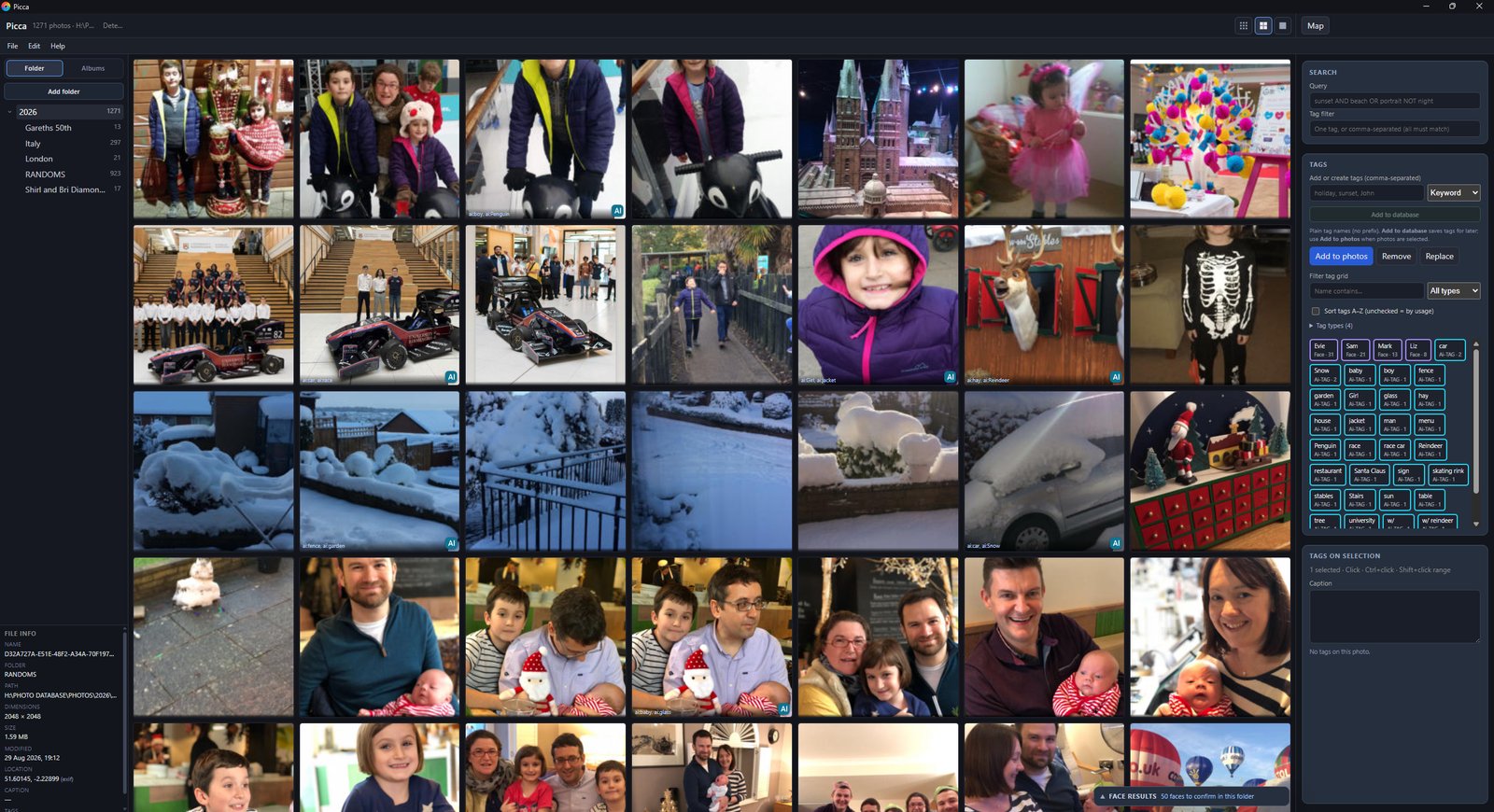
Create keyword, location and custom tag types. Add tags to single photos or thousands at once.
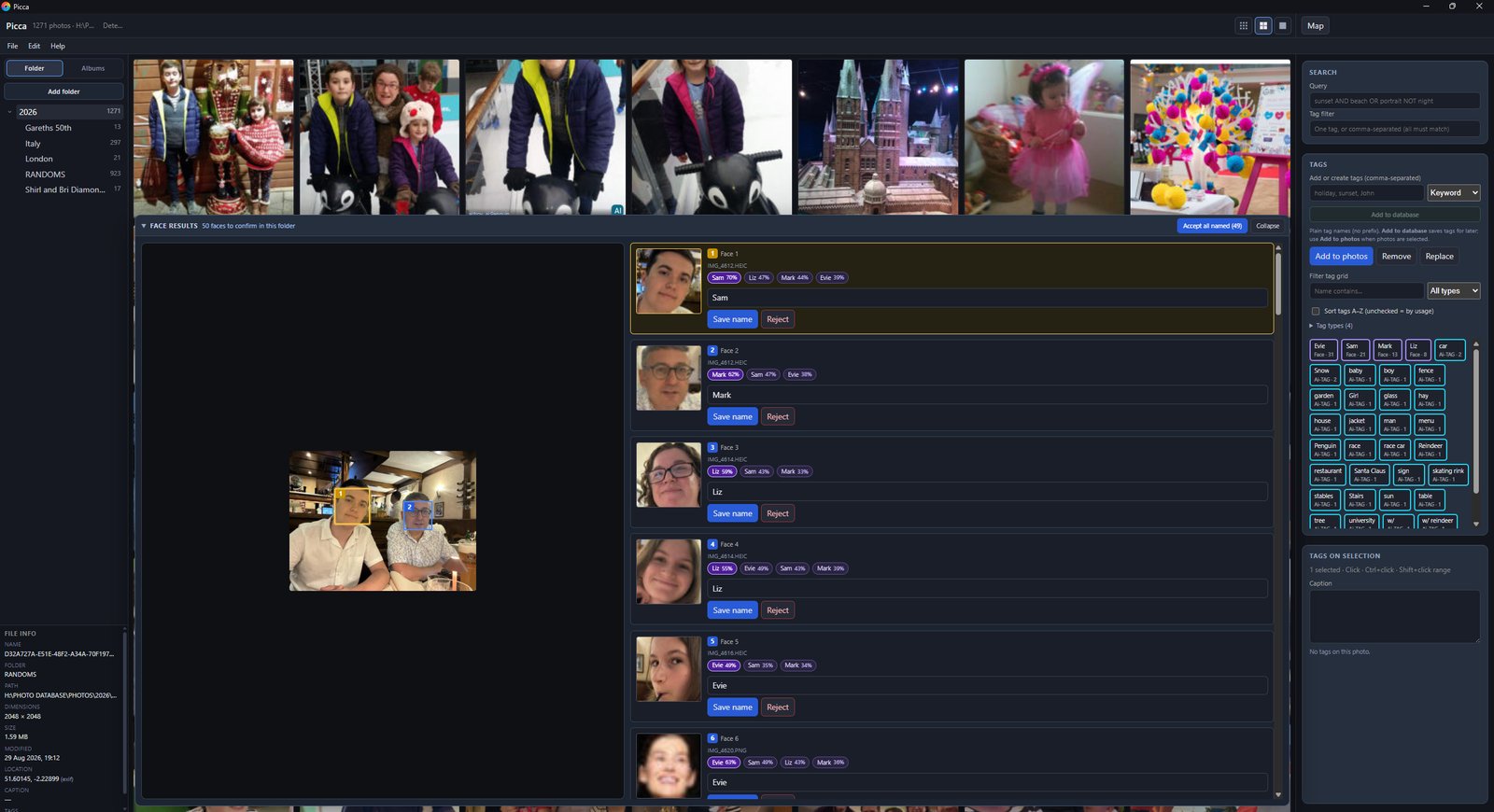
Detect and name faces automatically. Picca learns who’s who and suggests matches across your entire library.
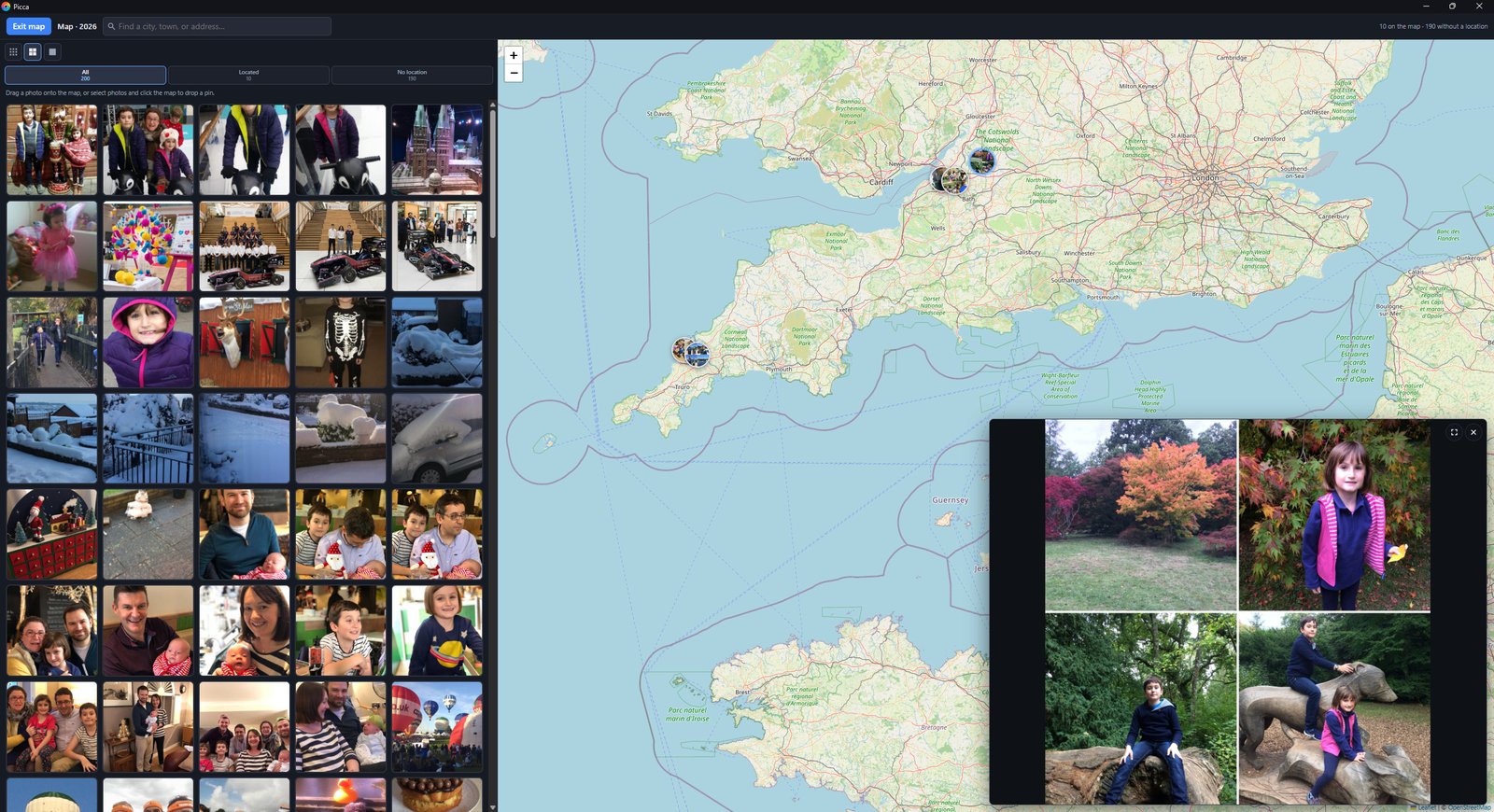
See where your photos were taken on a zoomable OpenStreetMap. Drag photos to the map to geotag them.
Full-screen slideshows with smooth crossfade transitions and ambient music — relive your memories cinema-style.
Browse your real folder structure or create virtual albums. Photos stay where they are — no imports needed.
Built with Rust and SQLite FTS5 for near-instant search across tens of thousands of photos.
Optional on-device tagging and captions with Moondream. It runs on your PC after a one-time local model download — no cloud account.
No account. No cloud. No subscriptions. Your data lives in a single local SQLite database you can back up anytime.
What's new
Find look-alikes and identical copies, rename files in batches, switch catalogues, and explore how tags connect — still entirely on your PC.
Catalogues JPEG, PNG, GIF, WebP, BMP, TIFF, and HEIC/HEIF/HIF from your folders. Files stay where they are — nothing is imported into a proprietary library.
Indexes clips alongside stills: MP4, M4V, MOV, AVI, MPEG, M2TS/MTS, MKV, and WebM. Thumbnails come from Windows; clips play in the viewer.
Right-click a still photo and choose Find similar photos. Picca ranks other stills in your library by how they look — the same scene, a burst, a reprint — not identical file copies, and not videos.
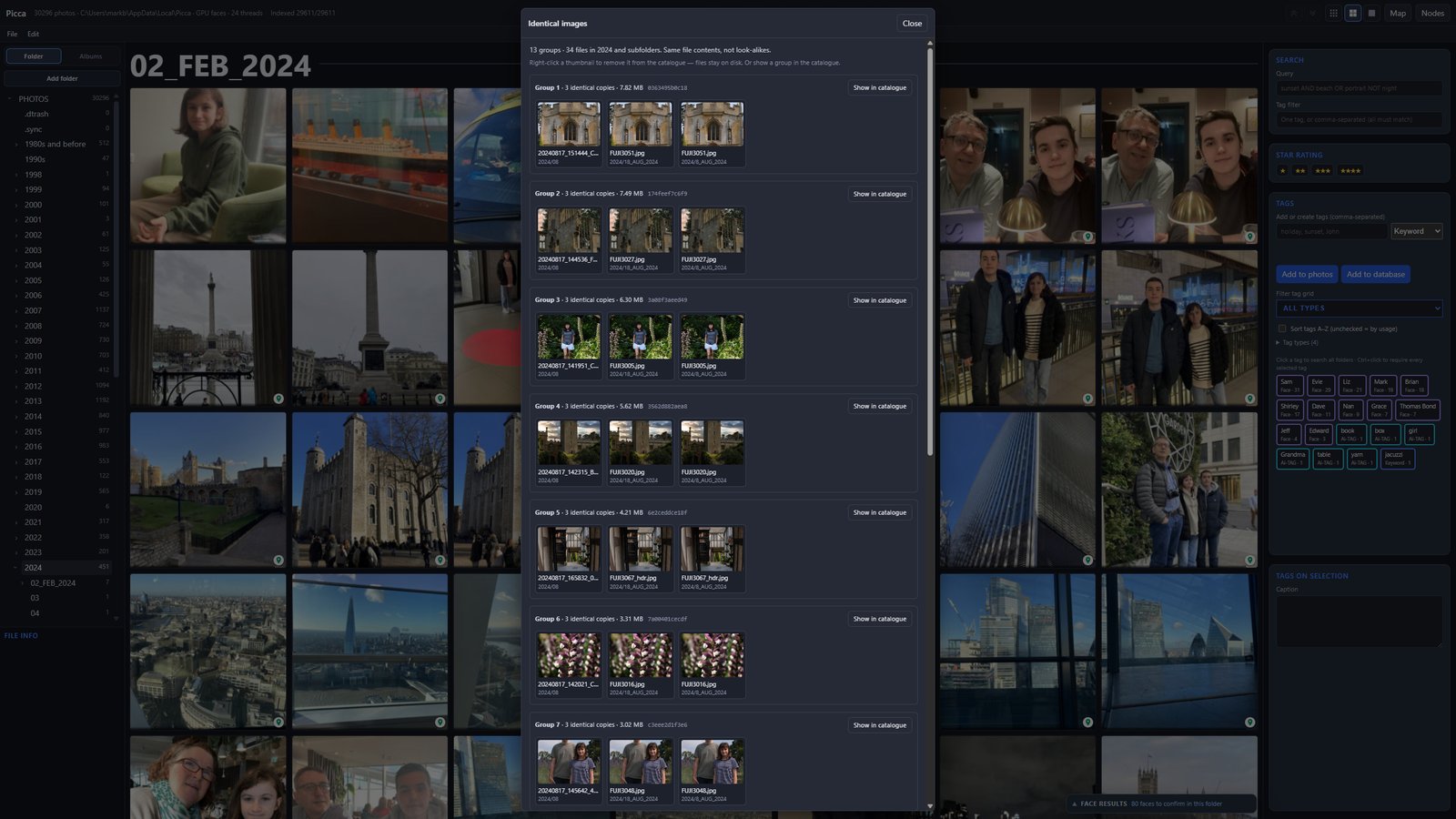
Group files with the same contents — identical copies, not near-matches. Review each group, show it in the catalogue, or remove extras from the catalogue without deleting files on disk.
Rename selected photos and videos on disk from one stem. Batches are numbered uniquely; the catalogue, search, and thumbnails stay in sync.
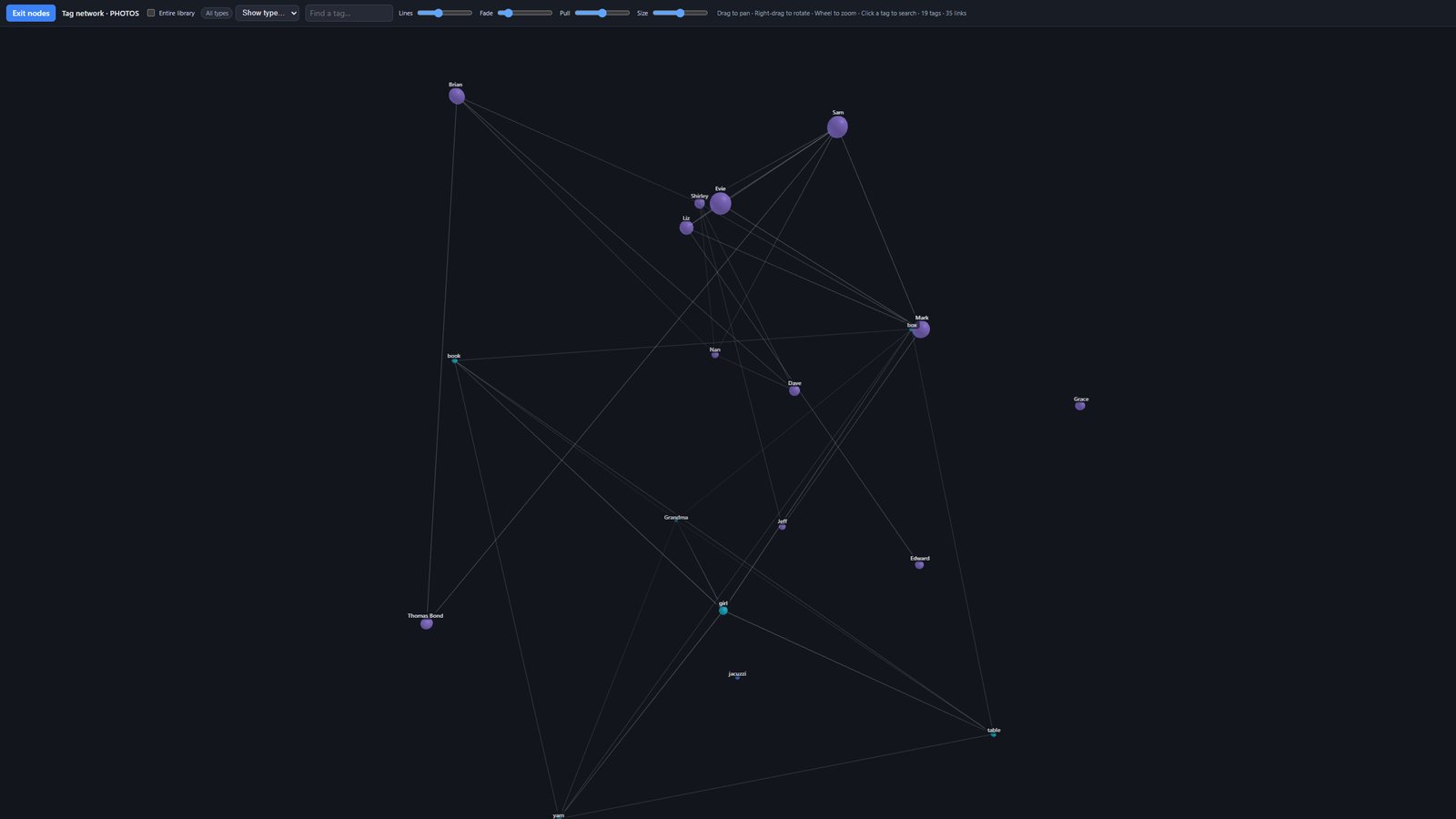
Open a 3D map of your tags. Nodes are sized by how often they appear; lines show tags that share photos. Click a tag to search it.
Open a different catalogue, or create a new empty one, without moving photo files. Each library keeps its own local database beside the folder you choose.
Start a small HTML server on this PC. Phones and other computers on the same Wi‑Fi can browse folders, thumbnails, full images, and slideshows — scan the QR code, or type the LAN address.
Look-alikes
Right-click a still photo and Picca searches the catalogue for shots that look like it. A local visual index runs on this PC. Photos never leave your hard drive. Tags, faces, and search stay as they are.
This is look-alike search, not duplicate finding. Identical file copies are a separate tool. Videos are skipped. If the folder has not been indexed yet, Picca offers to build the look-alike index first. The first time, it downloads DINOv2 Small once (about 85 MB, Apache 2.0) into the catalogue; after that the model stays on this computer.
File types
Picca catalogues these stills and video types from your folders. Files stay where they are — nothing is imported into a proprietary library.
HEIC — decoding uses Windows Imaging Component, so you may need the HEIF Image Extensions from the Microsoft Store. iPhone stills often also need HEVC Video Extensions.
Video — clips are indexed with stills. Thumbnails come from Windows; playback uses the codecs already on your PC. Look-alike search skips videos.
Picca vs Google Photos
Google Photos is a cloud backup. Picca is a desktop catalogue: your folders, your tags, your PC. No Google account, no storage meter, no subscription.
| What you get | Picca | Google Photos |
|---|---|---|
| Where photos live | On your PC, in your folders | Uploaded to Google’s servers |
| Who holds the library | You. One local SQLite catalogue you can back up | Google. The catalogue is their product |
| Account | None | Google account required |
| Price | £4.99 once | Free compressed quota, then Google One storage fees |
| Subscription | No | Yes, once you outgrow the free allowance |
| Internet required | No — the library works offline | Yes, for the cloud library |
| Search | Boolean AND / OR / NOT across tags, captions, dates and files | Google’s automatic labels; you do not run boolean over your own keyword system |
| Tagging | Keyword, people and place tags you control, including bulk edits | Limited; Google decides most of the labels |
| Face names | Detected and named on this PC | Processed in Google’s cloud |
| Map and geotagging | Map view; drag photos to assign a place | Shows GPS that is already in the cloud copy |
| Duplicates and look-alikes | Identical copies and visual similar-photo search | Basic cleanup; not a local duplicate tool |
| Files stay in place | Yes — nothing is imported into a silo | The upload is the library; your folders are not |
| Sharing | Optional browse-only server on your Wi‑Fi | Public or account links on Google’s servers |
| Try it | 7-day full trial on the Microsoft Store | Sign in with Google |
Guides
Short pages for the searches that usually bring people here. Each one ends on the Store trial.
Questions
Open the Microsoft Store listing, install Picca, and start the 7-day trial. The trial is the complete app — no feature locks and no watermarks. When you are ready, buy it on the same Store page for £4.99.
No. Picca is a one-time Microsoft Store purchase. Microsoft may show an equivalent price in your local currency at checkout.
No. Picca catalogues folders on your PC. There is no Picca cloud account. Optional extras such as map tiles or a one-time local AI model download do not upload your library.
Windows 10 and Windows 11. Picca is a desktop app, not a phone app and not a website for your photos.
Only on the  Microsoft Store. This website does not take card details.
Watch the 60-second tour above, then start the 7-day trial on the Microsoft Store. £4.99 once if you keep it.
 7-day free trial · then £4.99 once